Wireless Networking is a network that uses electromagnetic waves traveling through free space to connect stations or devices.
Introduction to the Internet?
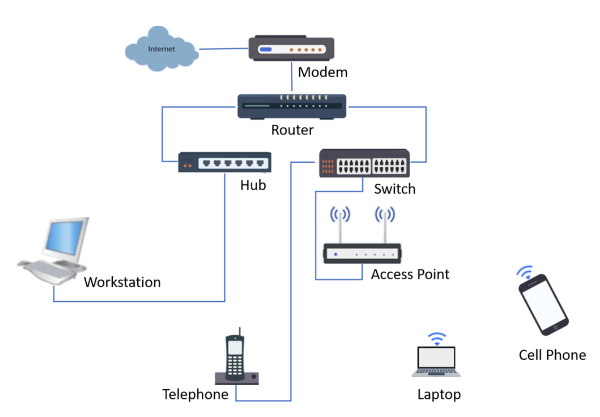
- Internet access requires some of the common devices such as modem, router, switch, and access point. A modem is used to connect to the Internet. A router acts as a gateway to the computer network and is placed between a modem and a switch or hub.
- A switch connects devices such as a desktop, laptop, and access point to the router. An access point connects a device wirelessly. Sometimes modem, router, switch, and access point come all bundled in one device.
- A computer network is a group of connected computers that can transfer data to each other. The Internet is a vast, sprawling collection of computer networks. The devices can be connected using wires, cables, and Wi-Fi.
Devices needed for the Internet connections
Several kinds of hardware and infrastructure responsible for making the Internet work for the home. The most important devices are shown as below:
- Modem – a modulator-demodulator hardware device that connects to the internet.
- Routers – connects a modem to different computer networks, ensuring that Internet traffic goes to the right networks.
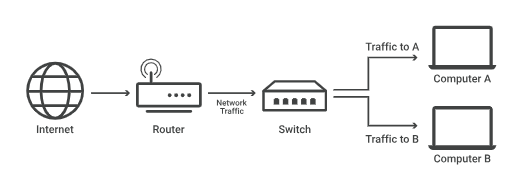
- Switches – connect devices within a single network, transfer incoming and outgoing internet traffic between the connected devices.
- Gateway – regulate traffic between two or more dissimilar networks.
- Access Point – this connects devices using wireless (Wi-Fi).
Router
What is a Router?
- A router is a device that connects two or more packet-switched networks or subnetworks.
- It serves two primary functions: managing traffic between these networks by forwarding data packets to their intended IP addresses, and allowing multiple devices to use the same Internet connection.
Advantages of Router:
- It provides sophisticated routing, flow control, and traffic isolation.
- Reduce network traffic by creating collision domains.
- Reduce network traffic by creating broadcast domains.
- Can connect different network architecture, such as Ethernet and token ring.
- They are configurable which allows the network manager to make policy based on routing decisions.
- It can choose the best path across the internetwork using dynamic routing algorithms.
- It can reduce network traffic by creating collision domains and also by creating broadcast domains.
- Allow achieving loop so that redundant paths are available.
Switch
What’s a switch?
- A network switch connects devices within a network (often a local area network, or LAN*) and forwards data packets to and from those devices.
- A network switch forwards data packets between devices. Switches send packets directly to devices, rather than sending them to networks like a router does.
Advantages of switches:
- Increase the available bandwidth of the network.
- Help in reducing workload on individual host PCs.
- Increase the performance of the network.
- Networks which use switches will have less frame collisions. This is due to the fact that switches create collision domains for each connection.
- Switches can be connected directly to workstations.
Access Point
What is an Access Point?
- An access point is a wireless network device that acts as a portal for devices to connect to a local area network.
- Access points are used for extending the wireless coverage of an existing network and for increasing the number of users that can connect to it.
- A high-speed Ethernet cable runs from a router to an access point, which transforms the wired signal into a wireless one.
- Wireless connectivity is typically the only available option for access points, establishing links with end-devices using Wi-Fi.
Advantages of Wireless Access Point:
- More User Access
- Flexible Networking
- Mobility
Server
What is a server?
- A Server is a program or a device that provides functionality for called clients which are other programs or devices. This architecture is called the client-server model.
- A single overall computation is distributed across multiple processes or devices.
- Servers can provide various functionalities called services.
- These services include sharing data or resources among multiple clients or performing computations for a client.
- Multiple clients can be served by a single server, and a single client can use multiple servers.
Types of Servers and Their Applications
- File servers
- Print servers
- Application servers
- DNS servers
- Mail servers
- Web servers
- Virtual server
- Proxy servers
- Monitoring and management servers
NAS (Network-Attached Storage)
What is NAS?
- Network-Attached Storage (NAS) is a data storage device that accommodates digital files, such as photos, videos, music, and documents.
- As its name stands NAS allows you to access files via Wi-Fi or a wired networks based on your use cases.
- In general, NAS users place multiple hard disks into a NAS to build a RAID (Redundant Array of Independent Disks).
- RAID is a technology that combines multiple disks into one large storage space, which is called a volume.
What benefits does RAID provide?
- Capacity
- RAID is a technology that virtually combines multiple disks to build a huge storage capacity. RAID has several levels, such as RAID 0, 1, 5, and 6, to specify the balance of data striping, redundancy for disks, and parity information.
- For example, using four 4 TB drives to build RAID 5, then you will get up to 12 TB of free spaces and 4 TB of a blocked space for store parity information.
- Data protection
- The previous example may sound like wasting 4 TB of capacity, but parity information is key to protecting NAS files against drive failure.
- RAID 5 can sustain the loss of a single drive.
- The tolerable number of disk fault is various based on your RAID levels.
- Speed
- Since data is simultaneously written and read to multiple disks, NAS provides much faster data upload and download speeds.
- If you use NVMe SSDs to build a volume, the speed and response times will be at the same level as your local drives.
RAID ≠ backup
One thing to keep in mind is that RAID is NOT backup. To ensure your data safety, it is essential to maintain backups of important data on multiple devices, such as clouds, external drives, or remote servers.
What NAS can do?
- Search photos by people, things, and places.
- Store all of your files.
- Find files faster.
- Access from PC/Mac without impacting local spaces.
- Access files safely, anytime, and anywhere.
- Protect your QNAP from ransomware.